

Network management is the process of monitoring, operating, maintaining, and securing a computer network. It helps keep routers, switches, servers, wireless access points, and connected devices working reliably. Businesses use network management to reduce downtime, find connection problems, protect important systems, and make better use of their network resources.
For example, imagine a small office where employees suddenly cannot access shared files. Network management tools can help an administrator check which devices are online, identify a possible connection failure, and investigate what went wrong. Without that visibility, the administrator might need to check each device separately.
Network management covers more than watching a network’s status. It includes changing device settings, tracking performance, managing access, recording changes, and responding to problems. The right approach depends on the network’s size, purpose, devices, and security needs.
Short Definition
Network management is the process of monitoring, configuring, maintaining, and securing network devices and connections to help a computer network run reliably, efficiently, and safely.
Experience
Start by checking which devices your network contains and what problems you need to detect. A home router’s built-in tools may be enough for basic needs, while a larger network may benefit from dedicated monitoring software.
How Does Network Management Work?
Network management brings information from different network devices into a system that administrators can use to understand and control the network.
A typical process follows these steps:
- Discover network devices: Identify routers, switches, servers, access points, and other supported equipment.
- Collect information: Gather data about device status, traffic, errors, and performance.
- Review network health: Use dashboards, graphs, and alerts to identify unusual activity or possible faults.
- Investigate problems: Check the affected devices, settings, connections, and records to find the likely cause.
- Take corrective action: Repair a connection, adjust a supported setting, replace faulty equipment, or apply an approved configuration change.
- Check the result: Confirm that the device or service works as expected and continue monitoring it.
The exact process varies by network and software. Some systems only report problems, while others also let authorized administrators change settings or automate selected tasks.
A simple example
Imagine that a company uses several switches to connect office computers to its internal network. One switch stops responding.
A network management system might report that the switch is unreachable and show when the problem started. The administrator can then check power, cables, device status, and related alerts before deciding what to do.
The alert does not automatically prove that the switch has failed. A power problem, damaged cable, configuration error, or monitoring connection issue could produce a similar warning.
This is why network management combines monitoring with investigation and maintenance. Tools help identify where to look, but administrators still need to understand the evidence.
Cisco describes these capabilities in its network management overview.
What Are the Five Functions of Network Management?
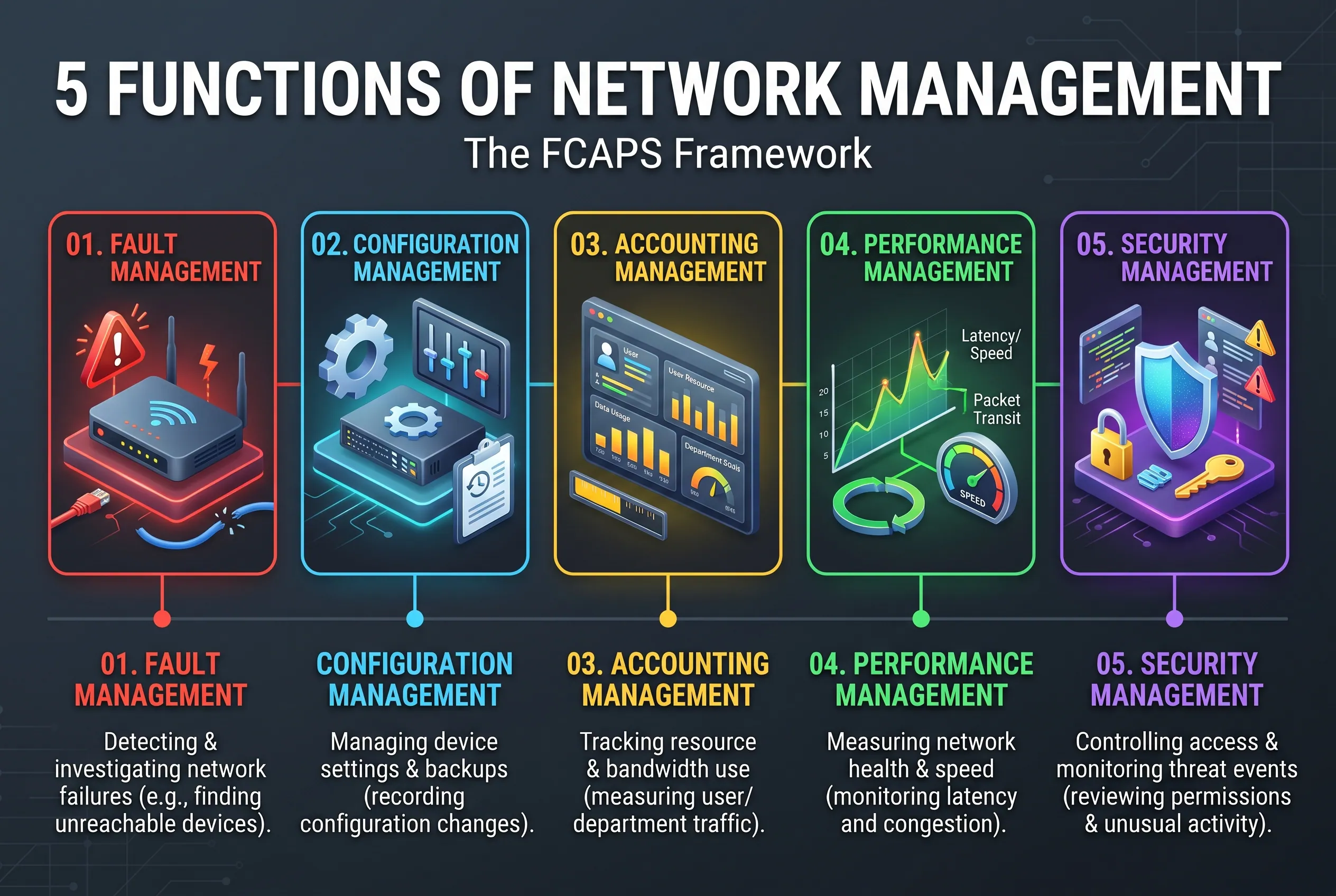 A common framework for understanding network management is called FCAPS. Its five functions are Fault, Configuration, Accounting, Performance, and Security management.
FCAPS provides a useful way to organize network responsibilities. The framework is not a promise that every software product will offer five separate tools or identical features. Actual capabilities depend on the product and its configuration.
| Function | What it means | Example |
| Fault management | Detecting and investigating network failures | Finding an unreachable router |
| Configuration management | Managing device settings and changes | Recording a switch configuration change |
| Accounting management | Tracking resource use | Reviewing bandwidth use by a department |
| Performance management | Measuring network health and efficiency | Finding high latency or congestion |
| Security management | Controlling access and monitoring security events | Reviewing access permissions and suspicious login activity |
The IETF’s RFC 4378 discusses FCAPS in the context of operations and maintenance for Multiprotocol Label Switching (MPLS) networks. The framework is also useful for explaining broader network management concepts.
1. Fault Management
Fault management helps administrators detect, locate, and investigate network failures.
A fault might involve a disconnected access point, a failed switch port, a broken network link, or a service that stops responding. Monitoring software can alert administrators when a device becomes unavailable or a measured value crosses a set limit.
The goal is to identify problems quickly and restore normal operation.
However, an alert is only the starting point. Administrators should check the cause before changing settings or replacing equipment. Otherwise, they may fix the wrong problem or create another one.
2. Configuration Management
Configuration management covers the settings that control how network devices operate.
These settings might define which networks a device connects to, how traffic moves, which users can access a service, or how a switch handles connected devices.
Good configuration management includes keeping records of important changes and, where supported, saving configuration backups. These records make it easier to identify what changed before a problem appeared.
For example, if an office loses access to a shared server after a network change, the administrator can review the configuration history. If the change caused the issue, an approved rollback may restore the previous working settings.
Configuration changes should be planned and checked. An incorrect change can disconnect users or weaken security.
3. Accounting Management
Accounting management tracks how network resources are used. Depending on the network, this can include bandwidth, connection time, traffic volumes, or resource use by users and departments.
A company might use this information to understand which services consume the most bandwidth or whether a network resource is being used as expected.
Accounting management does not always mean billing customers. It can also support planning, cost allocation, and capacity decisions.
For example, if a department regularly uses large amounts of network capacity during business hours, the company may need to review its applications, schedule some transfers outside busy periods, or increase capacity.
The information available depends on what the network equipment and software can measure.
4. Performance Management
Performance management helps determine whether a network is operating well enough for its intended use.
Administrators may monitor:
- Bandwidth: The amount of data a connection can carry over time.
- Latency: The time data takes to travel between two points.
- Packet loss: Data packets that fail to reach their destination.
- Availability: Whether a device or service is accessible when needed.
- Error rates: How often network communication encounters errors.
These measurements answer different questions. A connection can have plenty of bandwidth but still feel slow if latency is high or packets are being lost.
For example, video calls may freeze even when basic web browsing works. An administrator can compare network measurements with the timing of the problem to investigate congestion, wireless interference, or another cause.
Performance management also supports planning. Historical data can reveal recurring busy periods or a gradual rise in resource use before it becomes a serious problem.
5. Security Management
Security management helps control who can access network devices and services, monitor relevant events, and maintain protective settings.
Its tasks may include managing administrator permissions, reviewing logs, checking device updates, and monitoring for unusual activity. More advanced platforms may also connect network visibility with other security systems.
For example, repeated failed login attempts on a network device may justify an investigation. Logs can help show what happened and when.
Security management cannot guarantee that a network is safe. It works alongside other protections, including strong authentication, secure configurations, timely updates, and appropriate security policies.
What Is a Network Management System (NMS)?
A network management system (NMS) is software or a platform that helps administrators monitor and manage network devices from a central place.
It can collect device information, display dashboards, generate alerts, store historical measurements, and provide supported controls for managing equipment. Depending on the product, an NMS may also support configuration backups, reporting, automation, or security monitoring.
The distinction is important:
- Network management is the overall process of running, monitoring, maintaining, and securing a network.
- Network management software provides tools for carrying out some or all of that process.
- Network monitoring is the part focused on observing network status and performance.
An NMS may include monitoring features, but monitoring alone does not cover every network management responsibility.
Cloud-based versus on-premises systems
Network management systems can use different deployment models.
Cloud-based management: The management platform runs through a provider’s cloud service. Administrators can manage supported equipment through an online dashboard. This can simplify access across several locations, but it introduces questions about internet dependence, account security, data handling, and subscription costs.
On-premises management: The organization runs the management software on its own local server or other supported infrastructure. This can offer more direct control over the hosting environment, but the organization is responsible for maintaining that system and securing access to it.
Neither option is automatically better for everyone. The appropriate choice depends on the organization’s equipment, staffing, policies, connectivity, and support requirements.
What Are Common Network Management Tools and Protocols?
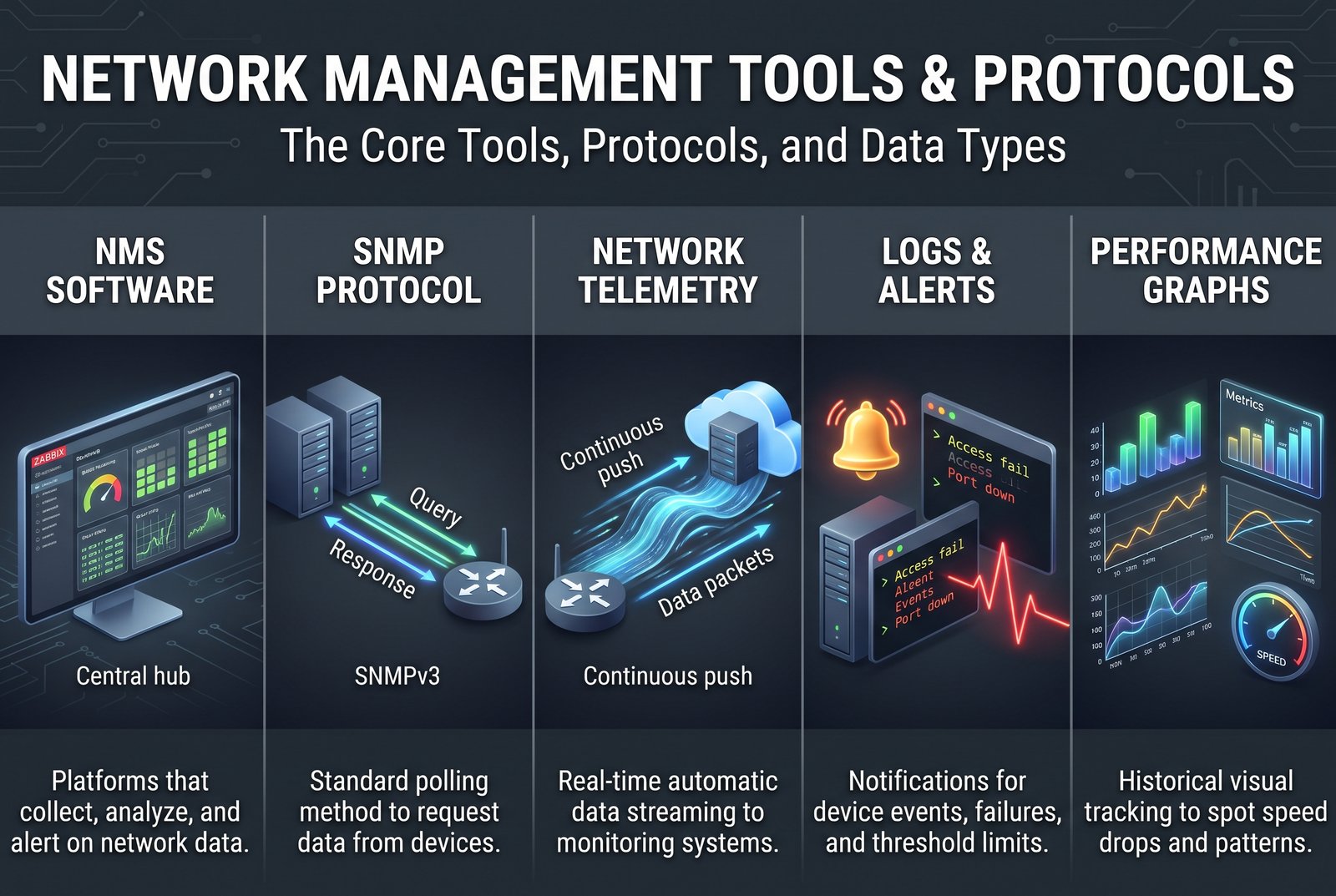 Network management tools collect information, organize it, present it to users, and sometimes control supported devices. Protocols help those devices exchange management information.
The best tool depends on what needs monitoring, how large the network is, which devices it contains, and how much setup and maintenance the organization can handle.
Network management software
Some examples include:
- Zabbix: An open-source monitoring platform that collects information from IT infrastructure, sends alerts, and stores historical data for analysis.
- Paessler PRTG Network Monitor: A monitoring product that uses sensors to track selected aspects of network devices and services.
- ManageEngine OpManager: A commercial monitoring platform designed to provide visibility into device health, network performance, and alerts.
- SolarWinds Network Performance Monitor: A commercial tool for monitoring supported devices, examining performance measurements, and investigating network faults.
These are examples, not a universal ranking. Their capabilities, licensing, supported platforms, and setup requirements differ.
Before choosing one, check whether it supports your routers, switches, servers, and other devices. Also consider whether you need performance monitoring, configuration management, security reporting, or only basic availability alerts.
SNMP and network telemetry
SNMP, or Simple Network Management Protocol, is a standard method for exchanging management information with supported network devices.
An NMS can use SNMP to request details from a compatible router or switch. Depending on the device and available information, that data may help show interface status, traffic counters, errors, or other measurements.
SNMP is widely supported, but not every device exposes the same information. Administrators must check device compatibility and configure access correctly.
Security matters, too. Older SNMP versions have weaker security properties. Where supported, SNMPv3 offers security features that earlier versions do not provide in the same way. The configuration should use appropriate authentication, privacy, and access controls rather than relying on default credentials or settings.
Network telemetry is a broader approach to collecting and analyzing network data. Depending on the system, devices may send measurements automatically rather than waiting for repeated requests.
The IETF’s RFC 9232 describes a framework for generating, collecting, correlating, and using telemetry data to understand network behavior and support management.
SNMP and telemetry are not interchangeable in every setup. The supported methods depend on the equipment, software, available interfaces, and monitoring goals.
Logs, alerts, and performance graphs
Management software can also combine device measurements with logs and alerts.
- Logs record events, such as device restarts, connection failures, or authentication attempts.
- Alerts notify administrators when a device becomes unavailable or a metric crosses a configured limit.
- Performance graphs show measurements over time so administrators can spot repeated problems or changing patterns.
These features are most useful when configured around meaningful questions. An alert for a critical server going offline may need immediate attention, while a brief change in a low-priority measurement may not.
Too many poorly configured alerts can make important warnings harder to notice.
How much does network management software cost?
Costs range from no software license fee to substantial recurring business subscriptions. The total cost depends on the product, monitoring capacity, required features, hosting, installation, and ongoing maintenance.
For example, when checked on October 21, 2026, Paessler’s official pricing page listed its PRTG 500 subscription at $200 per month, paid annually, with capacity for up to 500 sensors. The vendor estimates that this license can monitor multiple aspects of about 50 devices.
The same page lists a freeware edition with up to 100 sensors for about 10 devices. A sensor measures a particular aspect of a device or service, so the number of sensors is not the same as the number of devices.
These are vendor-published figures, not an industry average. Check the current US checkout price, licensing terms, taxes, and system requirements before budgeting. Free or open-source software can reduce license costs, but setup and maintenance still require time and technical effort.
How Does Network Management Support Security?
Network management supports security by giving authorized staff better visibility into devices, configurations, access, and network activity.
Useful practices include:
Limit administrative access. Give users only the permissions they need. Protect management accounts with strong authentication and avoid sharing administrator credentials.
Keep devices updated. Review available firmware and software updates, check compatibility, and apply changes using the vendor’s guidance. An update should not be treated as risk-free; important services may need planning before maintenance.
Use network segmentation where appropriate. Segmentation separates a network into sections with different access rules. For example, a business may separate guest Wi-Fi from internal systems so visitors do not receive the same access as employees.
Review logs and alerts. Logs can help an administrator investigate repeated authentication failures, unexpected configuration changes, or other unusual events. The National Institute of Standards and Technology’s guide to computer security log management explains the role of collecting, maintaining, and reviewing security logs.
Protect management interfaces. Do not expose device administration pages directly to the public internet unless a supported, carefully secured design specifically requires it. Use appropriate remote-access controls and restrict access to authorized people and systems.
An NMS itself also needs protection. Depending on its privileges, a compromised management platform could expose sensitive network information or allow harmful changes. Secure its accounts, updates, hosting, and access just as carefully as the devices it manages.
How Is Network Management Used at Home and at Work?
Network management looks different depending on the number of devices, the services being supported, and the consequences of a failure.
Home Wi-Fi and smart-home networks
A typical home network may contain a router, phones, computers, televisions, cameras, and smart-home devices.
For many households, the router’s built-in management page or mobile app is enough to check connected devices, change Wi-Fi settings, update supported firmware, and review basic status information.
A dedicated NMS is usually unnecessary for a small home network unless the owner wants more detailed monitoring, has many devices, or enjoys managing network infrastructure.
For smart-home users, compatibility is important. Some devices communicate through Wi-Fi, while others use protocols that require a separate hub or controller. Network management can help investigate connectivity, but it cannot make an incompatible device work with a platform it does not support.
Small-business networks
A small business may need to manage access points, switches, computers, printers, point-of-sale systems, and shared servers.
Centralized monitoring becomes useful when an outage can interrupt work or when checking each device manually takes too long.
For example, a business might monitor its internet connection, office switch, and critical server. Alerts can help staff identify which service became unavailable, while historical data may help explain repeated interruptions.
The business should also consider who will maintain the system. Installing monitoring software without deciding who will review alerts or act on them may create extra work without solving the underlying problem.
Enterprise networks
Large organizations may manage equipment across offices, data centers, cloud environments, and remote locations. They often need broader visibility, detailed access controls, configuration records, reporting, and coordination between IT teams.
Centralized management can help teams use consistent settings and investigate problems across multiple locations. Automation may also reduce repetitive work, such as applying approved configurations to many devices.
However, broader automation increases the importance of testing, permissions, change records, and recovery plans. A mistake applied to one device may be manageable; the same mistake applied across many devices can cause a much larger outage.
What Are the Benefits and Limitations of Network Management?
Network management offers several practical benefits:
- Faster troubleshooting: Alerts and device information help narrow down where a problem may be occurring.
- Better performance visibility: Measurements and historical graphs help identify congestion and recurring faults.
- More controlled changes: Configuration records can help administrators understand what changed and restore a known working setup when appropriate.
- Improved security oversight: Access reviews, device status, and logs can support security investigations.
- Better planning: Usage trends help organizations judge when network capacity or equipment may need attention.
These benefits are not automatic. Poor configuration, incompatible devices, missing data, or neglected alerts can reduce the value of a management system.
There is also a cost in time, money, and complexity. Administrators need to configure monitoring, protect the management platform, review alerts, maintain software, and decide how to respond to problems.
A small home network may work well with its router’s built-in tools. A business that depends on its network throughout the day may benefit from a dedicated system. The right level of management is the one that fits the network’s risks and needs.
How Do You Choose Network Management Software?
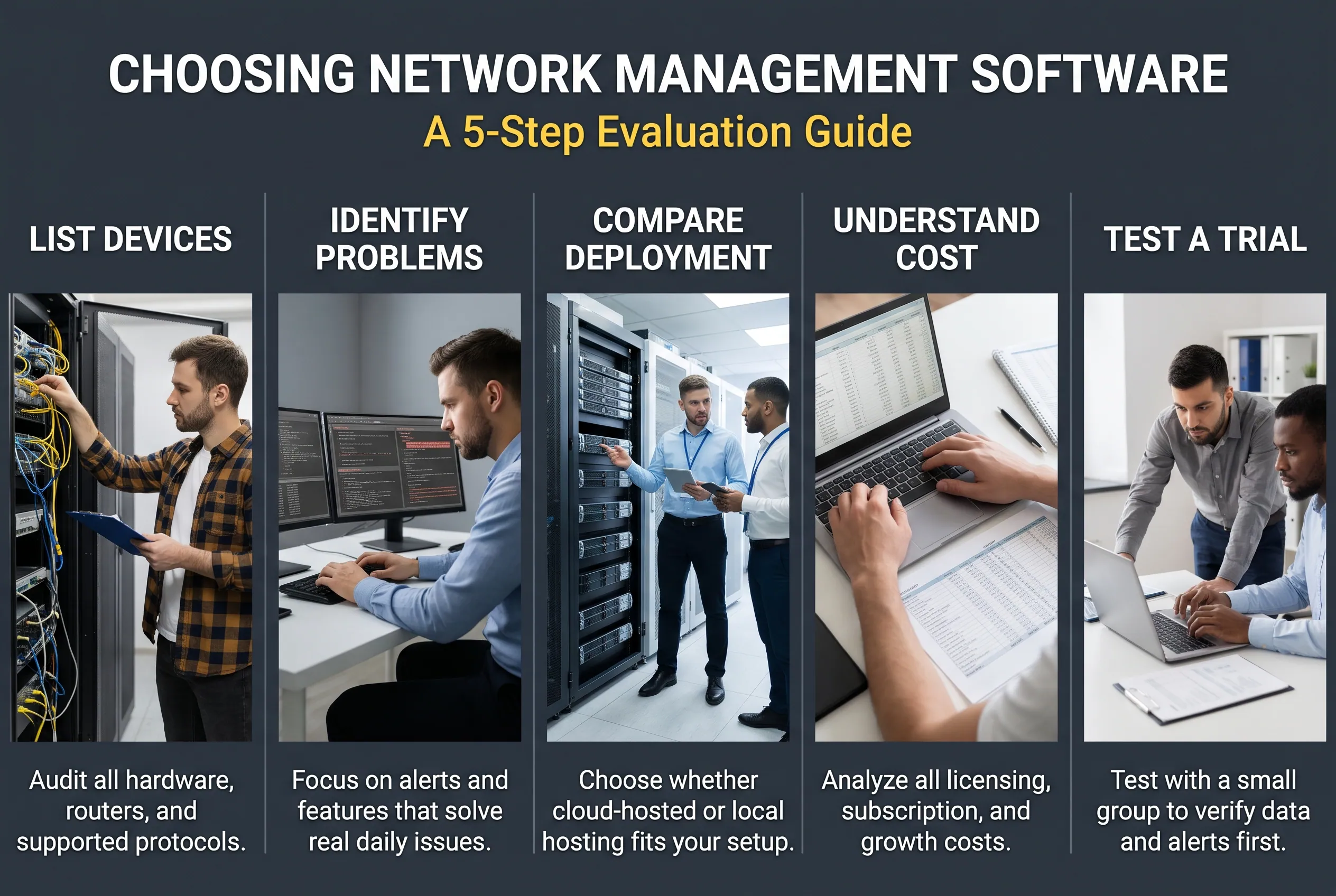
Before choosing network management software, identify what you need it to do. A useful evaluation starts with requirements, not a list of product features.
1. List the devices you need to monitor
Write down the types and models of routers, switches, access points, servers, and other equipment you want to monitor. Check which protocols and measurements each device supports.
Do not assume that a product can collect every metric from every device.
2. Decide which problems matter most
A small office may mainly need alerts when a router or internet connection goes down. A larger organization may also need traffic analysis, configuration backups, historical reporting, security integrations, or centralized management across multiple sites.
Choose features that solve real problems rather than paying for a long feature list you will not use.
3. Compare deployment and maintenance needs
Check whether the software runs on a supported local server, uses a cloud service, or offers both options. Review operating-system requirements, account needs, network access, storage, backups, and update procedures.
Cloud management may reduce some local maintenance work, while on-premises software may give an organization more direct control over hosting. Neither removes the need to secure the system.
4. Understand the full cost
Compare license limits, subscription periods, installation effort, support, hosting, and future growth. Some products charge by device, while others use sensors, interfaces, feature tiers, or another licensing measure.
A free version may be enough for basic needs but may limit scale or features. Paid software may offer more support and functionality, yet still be poor value if the organization cannot maintain it.
5. Test before rolling it out
Where a trial or suitable free edition is available, start with a small group of devices. Check whether the data is accurate, alerts are useful, and the interface makes sense to the people who will manage the network.
Confirm how the software handles credentials and collected data. Before allowing management software to make configuration changes, test those actions carefully and ensure there is a recovery plan.
What Network Management Mistakes Should You Avoid?
Even a capable network management system can provide little value if the process around it is weak.
Ignoring compatibility: Verify which protocols and features your network devices support. A product’s general compatibility claim may not cover every model or metric.
Creating too many alerts: Set thresholds around meaningful problems. Review recurring alerts and adjust them when they produce noise rather than useful warnings.
Forgetting configuration records: Record important changes and maintain suitable backups. Without a reliable history, it can be harder to determine why a network stopped working.
Leaving access too broad: Limit administrative privileges, remove access that is no longer needed, and secure management accounts and interfaces.
Treating monitoring as a complete solution: Monitoring can reveal symptoms, but it cannot always identify the cause or repair the problem. Investigate alerts and confirm that corrective actions worked.
Making risky changes too quickly: A configuration change can interrupt service or lock administrators out. Follow documented procedures and ensure recovery access is available before making changes that could affect connectivity.
The goal is not to collect the largest possible amount of data. It is to collect useful information and turn it into sound decisions.
Frequently Asked Questions
What is the difference between network management and network monitoring?
Network management covers the overall work of operating, maintaining, securing, and configuring a network. Network monitoring is one part of that work. It focuses on observing device status, traffic, performance, and alerts. A monitoring tool may identify a problem, while an administrator or a supported automated process takes action to resolve it.
What do network managers do?
Network managers and network administrators help keep networks available, reliable, and secure. Their tasks may include monitoring devices, troubleshooting outages, managing configurations, controlling access, reviewing logs, planning upgrades, and coordinating maintenance. Responsibilities vary by organization, and some tasks may be shared with security, cloud, or IT support teams.
Is network management software free?
Some network management and monitoring tools offer free or open-source editions, while others use paid subscriptions or licenses. Free editions may limit the number of devices, sensors, features, or available support. Even when the license costs nothing, setup, training, server resources, and maintenance can still create expenses.
How do you open network management settings?
The steps depend on what you mean by network management. In Windows 10 or Windows 11, open Start > Settings > Network & internet to manage basic connection settings. You can also right-click the network or Wi-Fi icon on the taskbar and select the network settings option. Microsoft’s Windows network settings guide explains the available options.
If you mean a professional network management system, open its supported web dashboard or application and sign in with an authorized account. The exact steps depend on the product.
What are the top network monitoring tools?
There is no single top tool for every network. Zabbix is an open-source monitoring option; PRTG offers sensor-based monitoring; ManageEngine OpManager provides centralized device and performance monitoring; and SolarWinds Network Performance Monitor focuses on network performance and troubleshooting. Compare their current features, licensing, supported devices, and maintenance requirements before deciding which fits your situation.
Choose a Practical Starting Point
Network management helps you understand what is happening on a network, why problems occur, and what needs attention. Its five FCAPS functions provide a useful way to organize those responsibilities, while management software can bring device information and alerts into one place.
For a home network, start by checking your router’s supported settings and keeping its software updated. For a business or larger network, document the devices that matter, identify the problems you need to detect, and compare suitable monitoring tools before investing in a full system.
The best starting point is not the most complicated tool. It is a reliable approach that fits your network, gives you useful information, and helps you act when something goes wrong.
Disclaimer
Network management features, software prices, device compatibility, and setup requirements vary by product, network, and software version. Verify official documentation before making configuration changes, and seek qualified help when a change could disrupt critical systems, compromise security, or cause loss of access or data.