

Subnetting becomes much easier when you follow a consistent calculation method. For IPv4, you need to understand the IP address, choose a subnet mask or CIDR prefix, calculate the block size, and identify the network address, broadcast address, and usable host range.
For example, the network 192.168.1.0/24 contains 256 total IPv4 addresses. Under conventional IPv4 subnetting, 254 are usable host addresses because the first address identifies the network and the last is reserved for broadcast.
This guide explains how to subnet an IP address step by step, with worked examples, a subnet mask reference table, and practical ways to check your calculations. It also covers important exceptions, common mistakes, and how IPv6 subnetting differs from IPv4.
Short Definition
Subnetting is the process of dividing an IP network into smaller logical networks. To subnet an IPv4 address, choose a CIDR prefix, calculate the subnet mask and block size, and identify each subnet’s network address, broadcast address, and usable host range.
Experience
Before assigning IP addresses, calculate each subnet’s network address, broadcast address, and usable host range. Then verify your results with a subnet calculator and check that the proposed ranges do not overlap existing networks. Remember that conventional IPv4 host-count rules have exceptions, including /31 point-to-point links and /32 host routes.
What Is Subnetting?
Subnetting is the process of dividing a larger IP network into smaller logical networks called subnets. Each subnet has its own network address and address range.
Instead of managing one large network, an organization can create separate subnets for departments, servers, wireless devices, or other groups of equipment. This can make IP address allocation, network management, and routing more organized.
For example, a small office might use the network 192.168.1.0/24. An administrator could divide it into four smaller subnets, each with 64 total addresses, rather than managing the entire address range as one network.
Subnetting is useful for several reasons:
- Efficient address allocation: Assign address ranges according to the number of devices each network needs.
- Network organization: Separate devices into logical groups.
- Routing: Routers use network prefixes to determine where IP traffic should go.
- Security planning: Separate subnets can support access-control rules and network segmentation, although subnetting alone does not provide security.
- Growth management: Reserve suitable address ranges for future devices and services.
The central idea is simple: a subnet mask or CIDR prefix determines which bits of an IP address represent the network and which bits are available for host addressing.
Modern IPv4 subnetting generally uses Classless Inter-Domain Routing (CIDR), rather than relying on the old fixed Class A, B, and C boundaries. The IETF’s RFC 4632 explains the CIDR addressing and routing approach.
Understand IP Addresses, Subnet Masks, and CIDR
Before calculating subnets, learn three basic concepts: IPv4 addresses, subnet masks, and CIDR notation.
What is an IPv4 address?
An IPv4 address is a 32-bit number, normally written as four decimal numbers separated by periods. Each number is called an octet and ranges from 0 to 255.
For example:
192.168.1.10
Its four octets are:
- 192
- 168
- 1
- 10
Each octet represents eight bits, so four octets make 32 bits.
An IP address alone does not tell you the complete network boundary. You also need the subnet mask or prefix length.
What is a subnet mask?
A subnet mask identifies the network portion of an IP address and the host portion.
A common subnet mask is:
255.255.255.0
In binary, that mask is:
11111111.11111111.11111111.00000000
The 24 leading ones represent network bits. The eight trailing zeros represent host bits.
This mask is equivalent to /24 in CIDR notation.
For the address 192.168.1.10/24:
- Network address: 192.168.1.0
- Broadcast address: 192.168.1.255
- Conventional usable host range: 192.168.1.1–192.168.1.254
- Total addresses: 256
- Conventional usable host addresses: 254
These results apply to an ordinary IPv4 broadcast subnet. Some prefix lengths, particularly /31 and /32, have special uses and do not follow the usual usable-host calculation in the same way.
What is CIDR notation?
CIDR notation writes the number of network bits after a forward slash.
Examples:
| CIDR prefix | Subnet mask | Host bits |
| /8 | 255.0.0.0 | 24 |
| /16 | 255.255.0.0 | 16 |
| /24 | 255.255.255.0 | 8 |
| /25 | 255.255.255.128 | 7 |
| /26 | 255.255.255.192 | 6 |
| /27 | 255.255.255.224 | 5 |
| /28 | 255.255.255.240 | 4 |
| /29 | 255.255.255.248 | 3 |
| /30 | 255.255.255.252 | 2 |
A larger prefix number means more network bits and fewer host bits. For example, /27 creates smaller subnets than /24.
How to convert CIDR to a subnet mask
To convert a prefix such as /26 into a subnet mask, count 26 network bits from left to right.
The first 24 bits fill the first three octets:
255.255.255
The remaining two network bits in the fourth octet are 11000000 in binary. That equals 192 in decimal.
Therefore:
/26 = 255.255.255.192
For prefixes that end in the middle of an octet, the common mask values are:
| Network bits in the octet | Binary | Decimal |
| 1 | 10000000 | 128 |
| 2 | 11000000 | 192 |
| 3 | 11100000 | 224 |
| 4 | 11110000 | 240 |
| 5 | 11111000 | 248 |
| 6 | 11111100 | 252 |
| 7 | 11111110 | 254 |
| 8 | 11111111 | 255 |
This pattern helps you convert many CIDR prefixes without writing out all 32 bits.
How to Subnet an IPv4 Network Step by Step
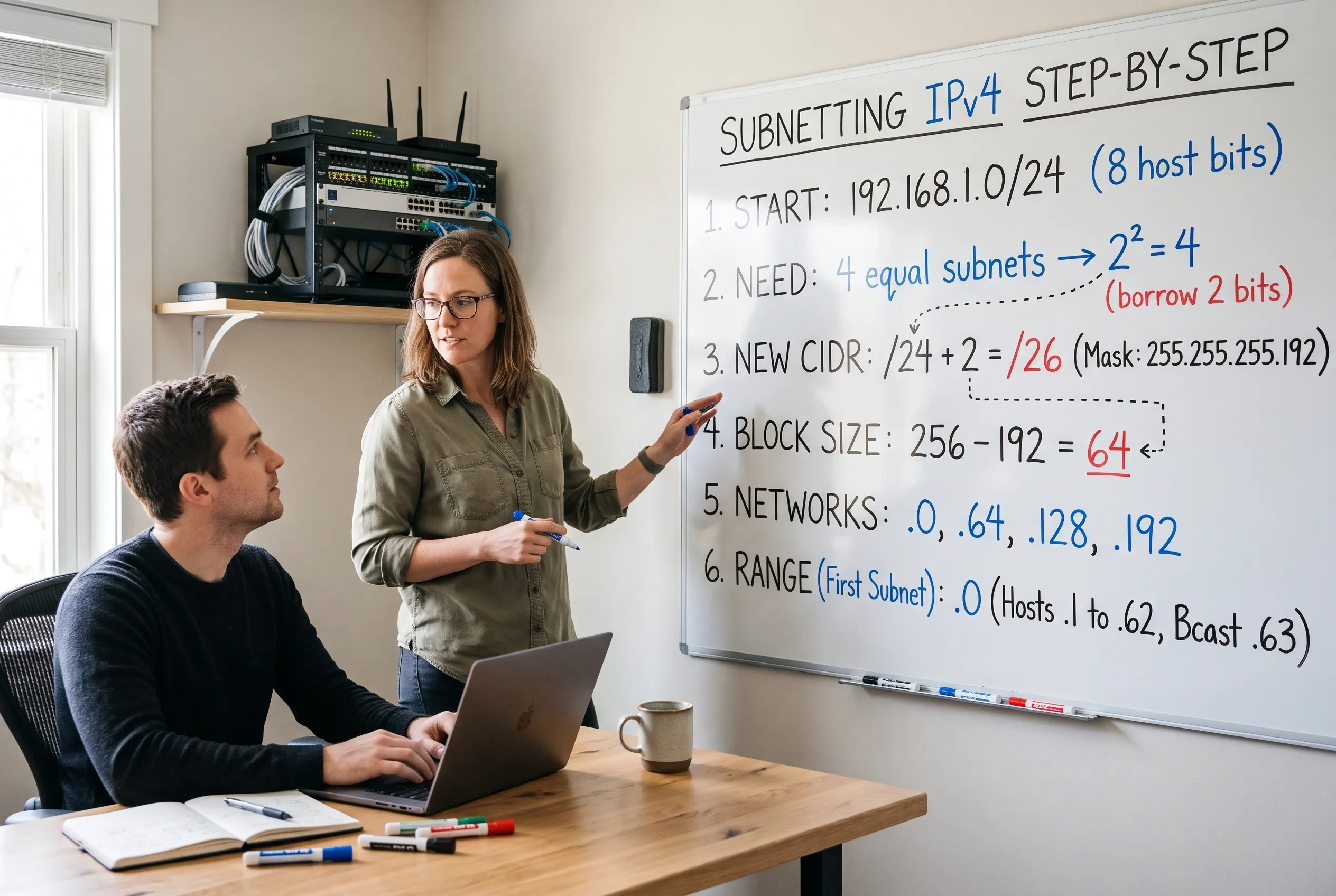 The following method works for ordinary IPv4 subnet calculations. Use it to find the subnet mask, block size, network address, broadcast address, and usable host range.
Step 1: Identify the original network
Start with the IP network you have been given.
For example:
192.168.1.0/24
The /24 prefix means the first 24 bits are network bits, leaving eight host bits.
If you have been given an individual host address rather than a network address, first determine its existing subnet mask and network boundary. Do not automatically assume that every address beginning with 192.168.1 belongs to a /24 network.
Step 2: Determine how many subnets or hosts you need
Your requirement affects the prefix you choose.
If you need a particular number of equal-sized subnets, determine how many additional bits must be borrowed from the host portion.
If you need a minimum number of host addresses in each subnet, determine how many host bits must remain.
For ordinary IPv4 subnets, the traditional usable-host formula is:
Usablehosts=2h-2
Here, h is the number of host bits. The subtraction accounts for the network and broadcast addresses in a conventional subnet.
For example, five host bits give:
25-2=30
That means a conventional /27 subnet provides 30 usable host addresses.
Remember that /31 point-to-point links and /32 single-address routes are special cases. The traditional formula should not be applied blindly to every IPv4 prefix.
Step 3: Calculate the new CIDR prefix
Suppose you want to divide a /24 network into four equal subnets.
You need enough borrowed bits to represent four subnet choices:
2s4
Two borrowed bits provide four combinations because 22=4.
Add those two bits to the original prefix:
24+2=26
The new prefix is /26.
Its subnet mask is:
255.255.255.192
You have created four equal-sized /26 subnets from the original /24.
Step 4: Calculate the block size
The block size tells you how far apart consecutive subnet network addresses are in the relevant octet.
For the /26 mask, the last octet is 192.
Use this shortcut:
Blocksize=256-maskoctet
Therefore:
256-192=64
The block size is 64. The subnet network addresses in this /24 are consequently spaced 64 addresses apart in the fourth octet.
The same method works for masks such as 128, 224, 240, 248, and 252 in the relevant octet. If a prefix ends in an earlier octet, perform the calculation at that octet instead.
Step 5: Find each network address
Start at the beginning of the original network and add the block size.
For 192.168.1.0/24 divided into /26 subnets, the network addresses are:
- 192.168.1.0
- 192.168.1.64
- 192.168.1.128
- 192.168.1.192
Each network starts at the previous network’s boundary plus 64 addresses.
Step 6: Find the broadcast and usable host addresses
For each conventional subnet, the broadcast address is the address immediately before the next subnet begins.
The first /26 subnet begins at 192.168.1.0, and the next one begins at 192.168.1.64. Its broadcast address is therefore 192.168.1.63.
The usable host range is the network address plus one through the broadcast address minus one.
For the first subnet:
- Network address: 192.168.1.0
- First usable host: 192.168.1.1
- Last usable host: 192.168.1.62
- Broadcast address: 192.168.1.63
Repeat the same process for the other subnet boundaries.
Worked Examples: Subnet a /24 Network
Let’s apply the method to two common subnetting problems.
Example 1: Divide a /24 network into four equal subnets
Suppose a business has this network:
192.168.1.0/24
It needs four equal-sized subnets for different departments.
Step 1: Calculate the borrowed bits.
You need four subnets, so:
22=4
Borrow two bits from the original eight host bits.
Step 2: Find the new prefix.
/24+2=/26
The new subnet mask is 255.255.255.192.
Step 3: Calculate the block size.
256-192=64
Each subnet contains 64 total addresses.
Step 4: List the subnet ranges.
| Subnet | Network address | Usable host range | Broadcast |
| 1 | 192.168.1.0/26 | .1–.62 | .63 |
| 2 | 192.168.1.64/26 | .65–.126 | .127 |
| 3 | 192.168.1.128/26 | .129–.190 | .191 |
| 4 | 192.168.1.192/26 | .193–.254 | .255 |
The abbreviated addresses in the last two columns use the same 192.168.1 first three octets as the network address.
Each subnet has 64 total addresses and 62 conventional usable host addresses.
The result is four non-overlapping subnets that cover the original /24 address range.
Example 2: Calculate a /27 subnet
Now suppose you need a subnet with approximately 25 devices. A /27 is a common fit for this requirement.
Consider:
192.168.1.96/27
Step 1: Find the subnet mask.
A /27 has 27 network bits and five host bits.
The subnet mask is:
255.255.255.224
Step 2: Calculate the block size.
Subnet boundaries in the last octet occur at multiples of 32: 0, 32, 64, 96, 128, 160, 192, and 224.
Step 3: Calculate the address range.
The subnet beginning at .96 ends immediately before the next boundary, .128.
- Network address: 192.168.1.96
- First usable host: 192.168.1.97
- Last usable host: 192.168.1.126
- Broadcast address: 192.168.1.127
- Total addresses: 32
- Conventional usable hosts: 30
A /27 therefore supports 25 devices in this conventional IPv4 example, with five usable addresses remaining.
Important check: The example assumes .96 is the intended subnet boundary and the surrounding address range is available. In a real network, verify the existing allocation, gateway requirements, DHCP range, and any reserved addresses before assigning devices.
How to Calculate Subnets for Different Network Requirements
 Not every subnetting problem asks you to divide a network into equal parts. Sometimes you know the number of subnets you need; other times, you know the number of devices each subnet must support.
When you need a specific number of subnets
Use this formula to find the minimum number of bits to borrow:
Here, s is the number of borrowed bits and N is the required number of subnets.
For example, suppose you need six equal subnets from a /24 network.
- One borrowed bit creates two subnets.
- Two borrowed bits create four subnets.
- Three borrowed bits create eight subnets.
You need at least six, so borrow three bits. The resulting prefix is /27, which creates eight equal subnets.
If all eight subnets fit your plan, this prefix meets the requirement. If you need only six, you can use six and leave the remaining address blocks unassigned for future use.
When you need a specific number of hosts
Find the smallest number of host bits that satisfies the conventional host formula:
Here, h is the number of host bits and H is the number of required host addresses.
For 50 hosts:
- Five host bits provide 30 usable addresses.
- Six host bits provide 62 usable addresses.
Six host bits are needed, giving a prefix of:
A /26 has 64 total IPv4 addresses and 62 conventional usable host addresses, so it accommodates 50 hosts.
Remember to account for interfaces, gateways, printers, servers, and other devices that need addresses. Your actual requirement may be greater than the number of end-user computers alone.
When subnets need different sizes
If one network needs 100 hosts and another needs 20, assigning both the same large address block may waste space.
Variable Length Subnet Masking (VLSM) allows different subnet sizes within a larger allocated network. Cisco explains this approach in its IPv4 addressing documentation.
For example, a conventional IPv4 design might allocate a /25 for a larger group and a /27 for a smaller group, provided both ranges fit within the parent network without overlapping.
When planning VLSM, allocate the largest subnet first, then place smaller subnets into the remaining address space. Check each subnet boundary before assigning addresses.
Quick Subnet Mask and CIDR Reference Table
Use this table as a quick reference when learning how to subnet an IP address.
| CIDR | Subnet mask | Total addresses | Conventional usable hosts |
| /24 | 255.255.255.0 | 256 | 254 |
| /25 | 255.255.255.128 | 128 | 126 |
| /26 | 255.255.255.192 | 64 | 62 |
| /27 | 255.255.255.224 | 32 | 30 |
| /28 | 255.255.255.240 | 16 | 14 |
| /29 | 255.255.255.248 | 8 | 6 |
| /30 | 255.255.255.252 | 4 | 2 |
| /31 | 255.255.255.254 | 2 | Special point-to-point use |
| /32 | 255.255.255.255 | 1 | Single-address prefix |
The conventional usable-host counts apply to ordinary IPv4 broadcast subnets. /31 prefixes are commonly used for point-to-point links, while /32 represents a single IPv4 address or host route. See the IETF’s CIDR reference for prefix sizes and address-block information.
A few patterns are worth remembering:
- Each increase of one in the prefix length halves the total address count.
- Each decrease of one in the prefix length doubles the total address count.
- /24 is a common small-network prefix, but it is not the default mask for every IP address.
- /30 provides two conventional usable host addresses, which can suit certain point-to-point IPv4 links.
- A subnet mask must be contiguous: network bits are ones followed by host bits that are zeros.
How to Use a Subnet Calculator to Check Your Answer
A subnet calculator can help you verify your manual calculations and reduce arithmetic errors.
Most subnet calculators accept an IPv4 address and CIDR prefix or subnet mask. Depending on the tool, the result may include the network address, broadcast address, total addresses, usable host range, and wildcard mask.
To check an answer:
- Enter the IP address and prefix, such as 192.168.1.96/27.
- Confirm that the displayed mask is 255.255.255.224.
- Check that the network address is 192.168.1.96.
- Verify that the broadcast address is 192.168.1.127.
- Compare the usable host range with your manual calculation.
- Confirm that the subnet does not overlap another range in your network plan.
Do not rely on a calculator without understanding its output. Tools may display total addresses and usable hosts differently, especially for special prefix lengths.
A useful learning exercise is to calculate the subnet manually first and then enter the same information into a calculator. If the results differ, revisit the prefix, mask, block size, and subnet boundary.
Common Subnetting Mistakes to Avoid
Even simple subnetting calculations can go wrong when you confuse prefixes, host counts, or address boundaries.
- Confusing total addresses with usable hosts.
A /27 has 32 total addresses, not 32 conventional usable host addresses. For an ordinary broadcast subnet, two addresses are reserved for the network and broadcast functions, leaving 30 usable hosts.
- Starting at the wrong subnet boundary.
A /27 uses a block size of 32 in the fourth octet. Its boundaries are .0, .32, .64, .96, .128, .160, .192, and .224. An address ending in .100 belongs to the .96 subnet, not a new subnet beginning at .100.
- Using the wrong mask octet.
The block-size shortcut applies to the octet where the mask changes from 255 to a value below 255. If the prefix extends into the second or third octet, calculate the block size there instead of automatically using the fourth octet.
- Assuming every 192.168.x.x address is a /24.
The prefix determines the subnet boundary. An address such as 192.168.1.130/26 belongs to the 192.168.1.128/26 subnet, not 192.168.1.0/24 as its directly connected subnet.
- Treating legacy address classes as modern subnet rules.
Terms such as Class A, Class B, and Class C are useful historical context, but modern networks generally use CIDR prefixes to define network boundaries. Do not choose a subnet mask solely from the first octet.
- Forgetting the wider network plan.
Correct calculations do not guarantee a working network. Duplicate IP ranges, overlapping subnets, DHCP settings, router interfaces, and firewall policies can still cause problems.
How Is IPv6 Subnetting Different from IPv4?
IPv6 subnetting uses the same broad idea of network prefixes, but the address format and common design practices differ.
An IPv4 address has 32 bits and is written as four decimal octets. An IPv6 address has 128 bits and is normally written in hexadecimal groups separated by colons.
For example:
- IPv4: 192.168.1.0/24
- IPv6: 2001:db8:1234:1::/64
Both use CIDR-style prefix lengths. In each case, the prefix identifies the network portion of the address.
However, IPv6 does not use IPv4-style broadcast addresses. It uses multicast and other mechanisms for communication with multiple devices. As a result, the IPv4 formula 2h-2 should not be applied to IPv6 subnet capacity.
IPv6 networks commonly use /64 prefixes for individual subnets, particularly in ordinary end-user and local-area network designs. The appropriate prefix still depends on the network architecture and requirements. The IETF’s IPv6 Addressing Architecture, RFC 4291, documents IPv6 address and prefix representation.
When planning IPv6 subnets, identify the prefix assigned to your organization, determine how many subnets are needed, and allocate prefixes consistently. Do not simply copy IPv4 address-conservation habits into IPv6 without considering its different addressing model.
Frequently Asked Questions
How do you subnet an IP address step by step?
Identify the original network and its prefix, determine how many subnets or hosts are required, select a new CIDR prefix, convert it to a subnet mask, and calculate the block size. Use the block size to find subnet boundaries, then identify the network address, broadcast address, and usable host range for each conventional IPv4 subnet.
How do you convert CIDR to a subnet mask?
Count the network bits represented by the CIDR prefix, starting from the leftmost bit. Convert each group of eight network bits into a decimal octet. For example, /26 has 24 full network bits followed by two network bits in the fourth octet, producing 255.255.255.192.
How many usable hosts does a /24 subnet have?
A conventional IPv4 /24 subnet contains 256 total addresses and 254 usable host addresses. The network address and broadcast address account for the difference. This count assumes an ordinary IPv4 broadcast subnet.
How do you calculate subnet block size?
Subtract the relevant non-255 subnet-mask octet from 256. For example, a /27 uses 255.255.255.224, so its block size is 256 – 224 = 32. Its subnet boundaries in the fourth octet occur at multiples of 32.
Is IPv6 subnetting different from IPv4 subnetting?
Yes. Both use prefix lengths to identify network portions, but IPv6 uses 128-bit addresses, does not use broadcast addresses, and commonly uses /64 prefixes for individual subnets. IPv4 host-count rules should not be transferred directly to IPv6.
Final Practical Advice
The easiest way to learn how to subnet is to repeat the same process until the calculations become familiar: identify the prefix, calculate the mask, find the block size, and verify the network boundaries.
Start with /24, /26, and /27 examples before moving on to larger networks, VLSM, and IPv6. Practise finding network and broadcast addresses without a calculator, then use a tool to check your results.
Most importantly, distinguish between total addresses and usable host addresses, and verify that your proposed subnets fit the wider network plan. With that foundation, subnetting becomes a repeatable calculation rather than a guessing exercise.
Disclaimer
This article is for general educational and informational purposes only. Network configurations vary by environment, equipment, and operational requirements. Verify IP addressing plans, subnet boundaries, routing, DHCP settings, and security policies before making changes to a live network. Consult qualified network professionals when necessary.