

IT support for startups can cover business email, laptops, software accounts, security, backups, and help with technical problems. But a new company does not always need a full-time IT employee. The right choice depends on how many people use your systems, how much downtime would hurt, what data you handle, and how often technical work needs attention.
For a small team with simple needs, secure cloud tools and one-time setup help may be enough. As the team grows, a managed IT provider or an internal employee may make more sense. Start by listing the work you need done, then compare support options by service scope and total cost—not by monthly price alone.
Direct Answer
IT support for startups can include business email, device management, cybersecurity, backups, and help desk services. Small teams may start with self-service or project-based help, while growing teams may need ongoing managed or in-house support.
Practical Business Tip
Before comparing providers, list your users, devices, software, key data, and recurring problems. Ask every provider to quote the same service scope, and check what’s excluded, how support is delivered, and how you can leave the contract.
What Does IT Support for Startups Include?
IT support helps people use the technology a business relies on. It may include setting up laptops, creating work email accounts, fixing software problems, managing permissions, updating devices, and helping employees connect securely from home or the office.
Some providers also manage backups, security tools, networks, cloud systems, and onboarding. Others focus only on help desk requests. Check the written scope; “IT support” does not mean every service is included.
It is also important to separate everyday business IT from product engineering. A company that sells software may need developers or DevOps specialists to build, deploy, and monitor its product. A help desk may support employees’ laptops and email, but that does not mean it can manage a live application, cloud architecture, or production outage. Ask for those skills specifically when your product depends on them.
When Does a Startup Need IT Support?
A startup may need professional help when technical work takes too much time away from customers and product development, problems keep returning, or the team cannot confidently manage account access and data protection.
Look for practical signs:
- New employees wait too long for laptops, accounts, or software access.
- Nobody knows who has administrator rights or how to remove access when someone leaves.
- Files exist in only one place, and no one has tested whether they can be restored.
- Staff lose time on repeated Wi-Fi, email, device, or software problems.
- The business handles sensitive customer information but has no clear security process.
- A technical outage could stop sales, service delivery, or work on the company’s product.
These signs do not automatically require a monthly contract. For a one-time email migration or laptop setup, hire a qualified professional and document the changes. If requests recur or security needs constant attention, ongoing support may fit better.
Which IT Support Services Should a Startup Get First?
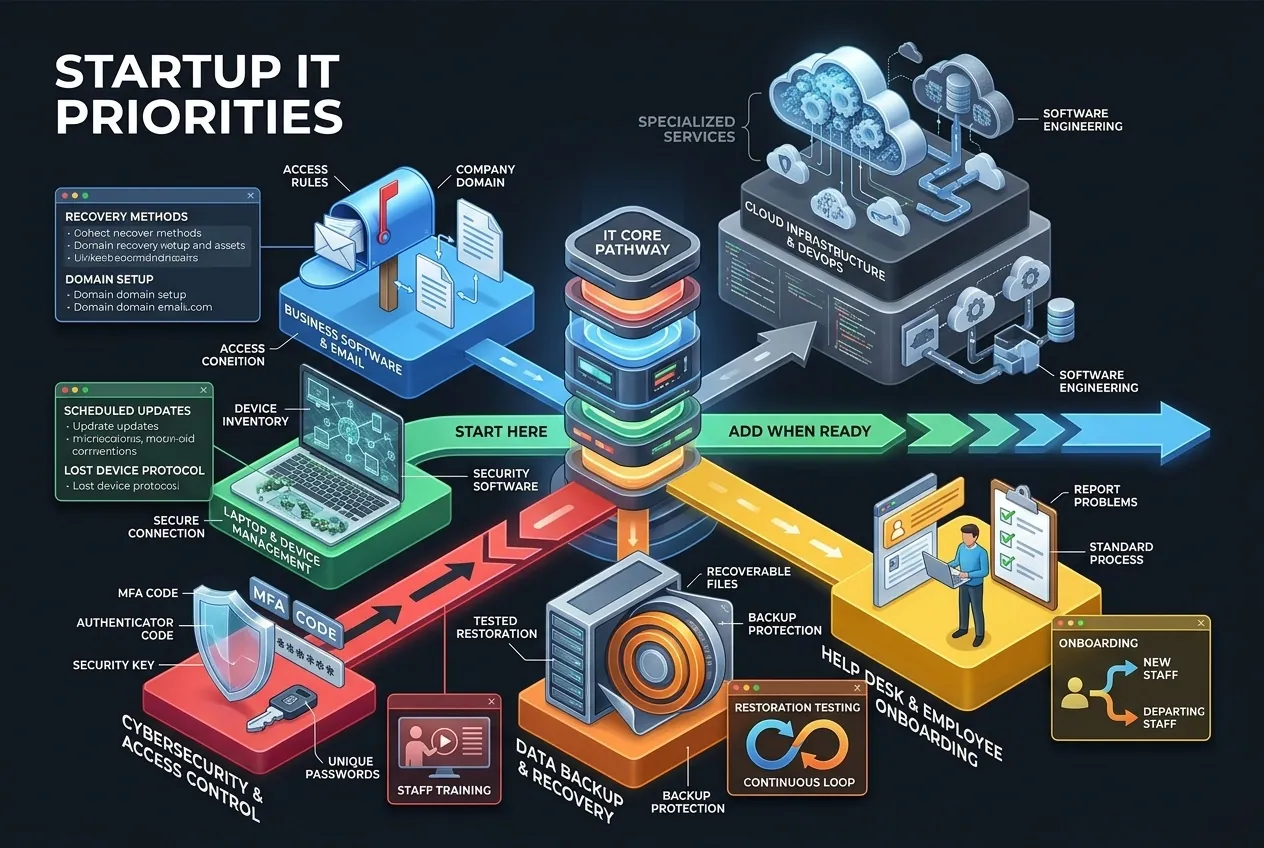
Begin with the services that protect daily work and the information your business cannot afford to lose. Add more specialized services when your systems, customers, or contractual duties require them.
Business Email and Cloud Software Setup
Choose a business email and file-sharing system, such as Microsoft 365 or Google Workspace, based on how your team works. Set up the company domain, individual accounts, recovery methods, and access rules. Avoid shared logins because they make permissions and activity harder to track.
Review what each plan includes. Business subscriptions may offer administration and security controls that personal plans do not. Features vary by tier, so use the providers’ official Microsoft 365 business pricing page and Google Workspace pricing page to confirm the current offer before buying.
Laptop and Device Management
Keep a list of company devices and their assigned users. Schedule updates, use suitable security software, and decide what to do if a device is lost or stolen. Remote teams also need a secure way to connect to company systems.
Some cloud plans include device-management features; other setups need separate tools or professional help. Check the plan and the devices it supports rather than assuming every subscription covers full device management.
Cybersecurity and Access Control
Require multi-factor authentication (MFA) for important business accounts. MFA adds a second proof of identity beyond a password, such as an authenticator-app code or security key. Use unique passwords, limit administrator access, install security updates, and train staff to recognize suspicious links and requests.
These steps reduce risk but cannot prevent every attack. The Federal Trade Commission’s Cybersecurity for Small Business guide covers safeguards, remote access, backups, and vendor security. Add protections based on your systems and data.
Data Backup and Recovery
Decide which files and systems must be recoverable, how often to back them up, and who will restore them. A backup is only useful if it works. Ask how often restoration is tested and whether backups are protected if normal accounts or the network are compromised.
Help Desk and Employee Onboarding
A help desk gives staff a clear place to report problems. Ask which devices and applications are covered, when support is available, how urgent issues are escalated, and whether on-site work costs extra.
Create a standard process for new and departing employees. New staff may need devices, email, approved software, and only the permissions their jobs require. When someone leaves, the business should recover equipment, transfer business files where appropriate, disable access, and review shared credentials. Agree on who performs each task—the provider, a manager, or an internal administrator.
Cloud Infrastructure and DevOps
A startup building an online product may need help with cloud hosting, deployments, monitoring, reliability, or production incidents. These are specialized services. Do not assume a standard employee IT package includes software engineering or DevOps. Describe your product, hosting environment, uptime needs, and technical stack, then ask providers to show that they can support them.
Which IT Support Model Is Right for Your Startup?
The right model depends on the work your startup needs. Common choices include:
| Support model | Best fit | Main trade-off |
| Self-service | A very small team with simple tools and time to manage them | Lowest service cost, but staff must handle setup, updates, and troubleshooting themselves. |
| Project-based or hourly help | A defined task, such as email setup, migration, or a device rollout | You pay for a limited job, but routine support after the project may not be included. |
| Managed IT provider | A team that needs regular help desk, device management, monitoring, or security support | More predictable coverage may come with a recurring fee, minimum term, or extra charges for excluded work. |
| In-house IT employee | A company with steady, business-specific technical work and enough budget to employ a specialist | Internal knowledge and availability, but salary, benefits, training, and cover for absence all matter. |
| Co-managed IT | A startup with some internal technical skills that needs outside specialists | Adds expertise without replacing the internal team, but responsibilities must be clearly divided. |
A small startup may begin with secure cloud tools and project-based help. A growing team may prefer managed support, while an engineering-led company may need internal ownership plus specialist help. These are starting points, not fixed rules.
For smaller companies, outsourcing can be a sensible way to access skills without hiring a full team. NIST’s guidance on building a small-business cybersecurity team recommends defining the outcomes you need, comparing vendors, documenting service responsibilities, and remembering that outsourcing does not remove the business’s responsibility for protecting its information.
How Much Does IT Support for Startups Cost?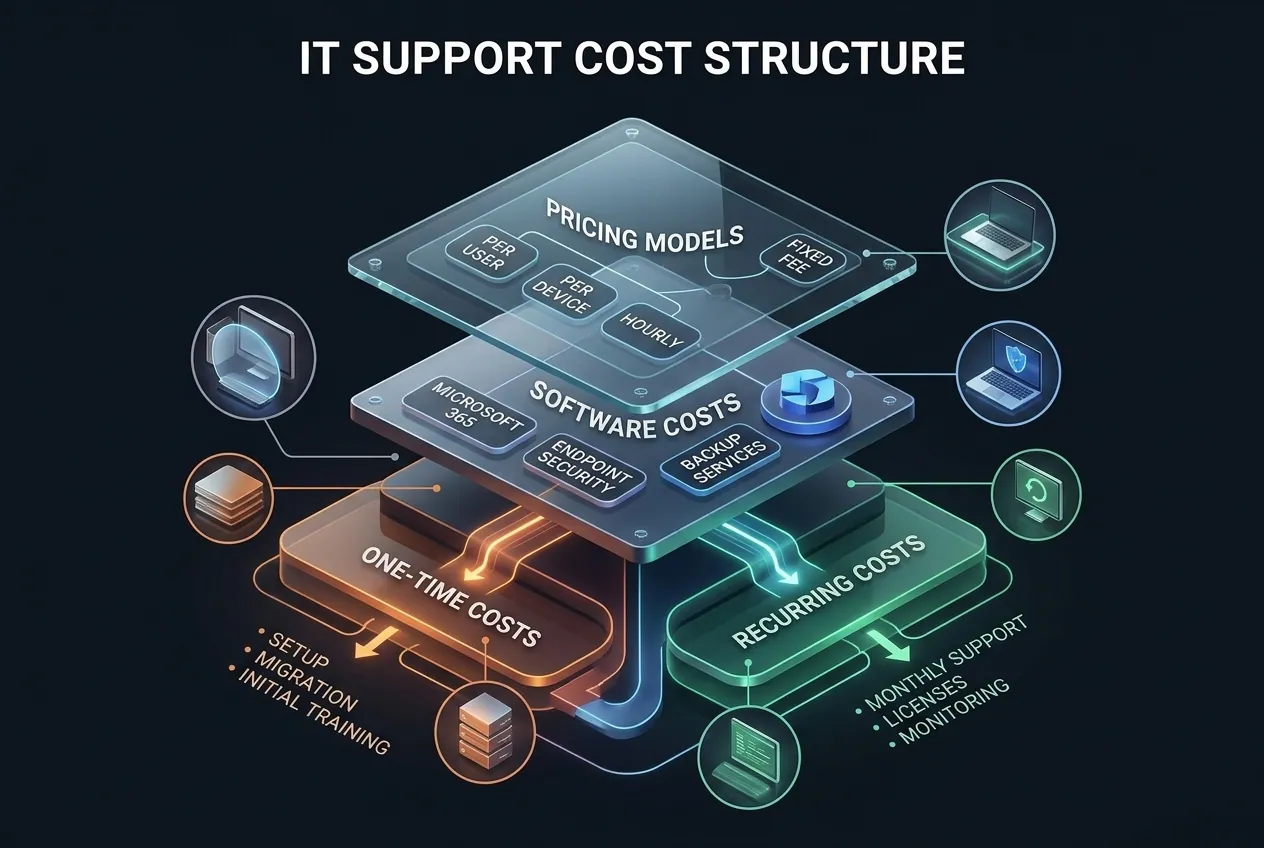
Price depends on your systems, users, devices, coverage hours, security needs, and applicable compliance duties. A basic help desk is not the same as a package with advanced security, backups, after-hours response, and strategic planning.
Common IT Support Pricing Models
Providers may charge per user each month, per device, by the hour, or through a fixed project fee. Managed-service contracts often bundle several services into one monthly price, but bundles differ. Some charge separately for onboarding, major migrations, on-site visits, after-hours work, or incident response.
A provider-published 2026 managed IT pricing guide from ATCOS Consulting reports a broad range of about 100–250 per user per month for many small businesses, with more basic or advanced arrangements outside that range. These are the provider’s estimates, not a verified national average or a guaranteed quote for startups. Use them to prepare questions, then request a price based on your own needs.
For a hypothetical team of five, that broad guide range would equal about 500–1,250 per month for managed IT support before separate software licenses, taxes, or excluded services. The actual quote could be lower or higher depending on what the package includes. Do not treat this example as a budget recommendation until you have compared quotes.
Separate Software Costs from IT Labor
Software subscriptions are a separate cost. As of October 21, 2026, Microsoft lists Business Basic at $7 per user per month paid yearly, or $5.40 for the version without Teams. Both are annual subscriptions that auto-renew, and prices can change. Check the official pricing page before buying.
If ten employees each need a $7 license, the listed monthly equivalent is $70, paid under the plan’s annual billing terms. That cost does not include IT setup or ongoing support. You may also need separate tools for backups, endpoint protection, device management, or specialist cloud work, depending on your setup and plan.
Build a Practical IT Budget
Before accepting a quote, make a list of required work and divide costs into two groups:
- One-time costs: setup, migration, device configuration, initial cleanup, and staff training.
- Recurring costs: software licenses, monthly support, backup services, security tools, and any ongoing monitoring.
Ask each provider to quote the same number of users and devices, the same coverage hours, and the same required services. Confirm what counts as extra work and whether the price changes when your team grows. A low monthly fee can become expensive if essential services are billed separately. Also check the contract term, renewal conditions, cancellation process, and any setup charges before committing.
How Should You Choose an IT Support Provider?
Write down what you need, then request comparable quotes from several suitable providers. NIST advises businesses to look beyond price and consider vendor experience, fit, and written responsibilities.
Use these questions during your evaluation:
- Do you support our systems? Name the email platform, operating systems, devices, business applications, and cloud services you use. If you run a software product, ask separately about its infrastructure and on-call requirements.
- What is included? Ask about help desk coverage, updates, backups, security monitoring, onboarding, offboarding, and on-site work. Request written exclusions as well as included services.
- How does urgent support work? Check support hours, response targets, escalation steps, and what happens outside normal business hours. A response target is not the same as a promise that every problem will be fixed within that time.
- How do you protect our data? Ask how staff access your systems, whether MFA is required for remote administration, how permissions are limited, and how vendor access is removed when work ends.
- What do we own if we leave? Confirm that your company retains control of its domain, cloud tenants, accounts, data, and administrator access. Ask how data will be returned and access transferred if you change providers.
- What can raise the bill? Check setup fees, hourly project work, after-hours response, on-site visits, new users, and contract renewal terms.
A service-level agreement (SLA) sets expectations such as support hours and response targets. Read it with the full contract, and get important promises in writing.
If a provider asks for broad access to your systems, make sure it is necessary and controlled. The FTC’s guidance on vendor security recommends limiting vendor access and including security expectations in vendor arrangements. Share only the access needed to perform the agreed work.
What Security Responsibilities Should Your Startup Keep?
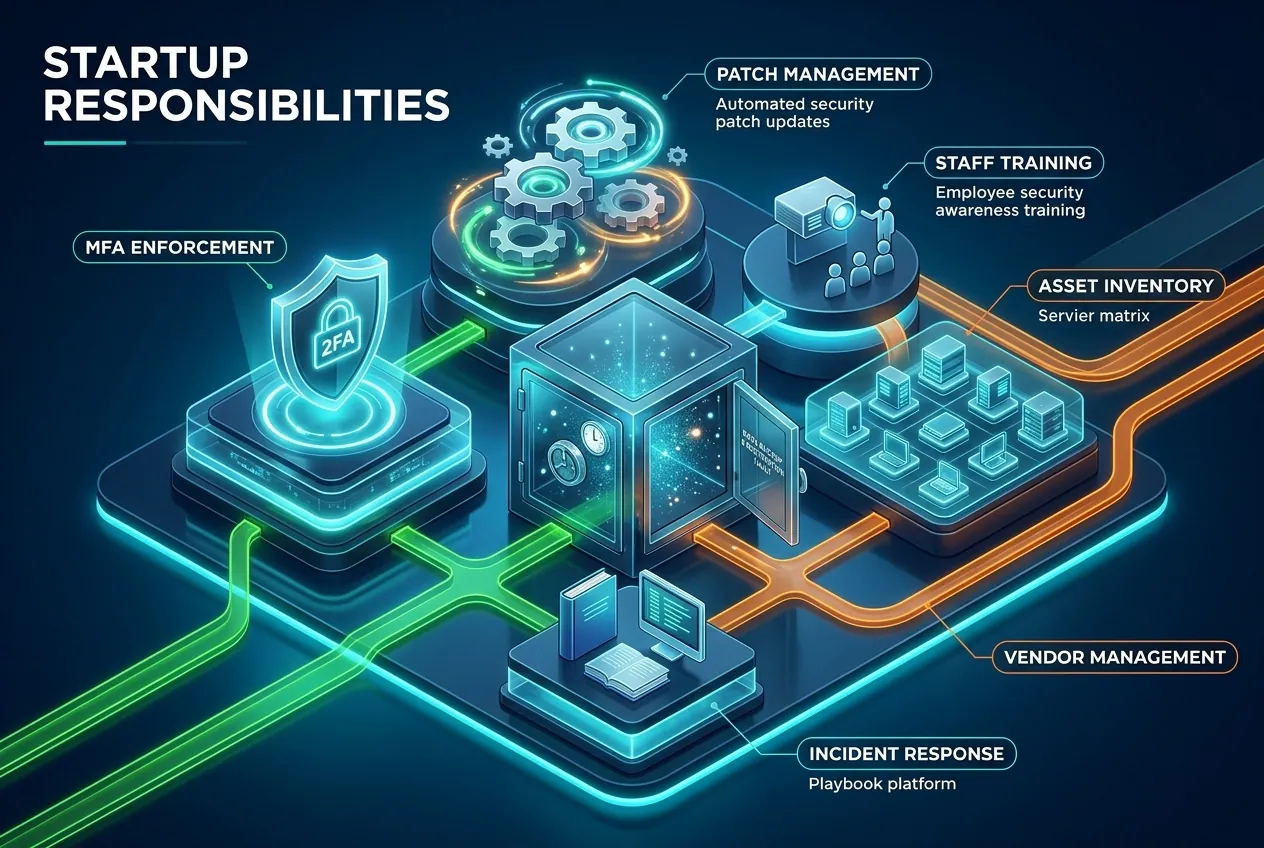
Outsourcing IT does not remove your responsibility for security. Agree on roles and identify who is responsible for:
- Requiring MFA and removing unnecessary access.
- Installing security updates on supported systems and devices.
- Backing up key information and testing restoration.
- Training staff to spot suspicious messages and report possible incidents.
- Keeping an inventory of company devices, software, and important data.
- Responding to a suspected breach, including who makes business decisions and who communicates with customers when required.
Write these responsibilities down. A provider may manage the technology, while company leaders still need to decide which data is sensitive, who should access it, and what the business must do if something goes wrong. Legal, contractual, or sector-specific duties vary. A startup handling health, payment, financial, or other regulated information should verify the requirements that apply to its own services and customers rather than relying on a general IT package to guarantee compliance.
IT Support Mistakes That Can Create Extra Costs
Buying a package before identifying the need. List current problems and required outcomes first. If you only need a one-time setup, compare project fees before accepting a long contract.
Comparing only the headline price. Two providers may charge different amounts because one includes backups or extended support and the other bills separately. Normalize quotes around the same service list.
Assuming backups are tested. Ask when a restore test was last completed and what evidence is available. A successful backup job does not prove that the business can recover quickly.
Confusing employee IT with product engineering. Confirm that the provider has the right skills for production systems, cloud infrastructure, and software deployment if your startup needs them.
Ignoring the exit plan. Make sure the company controls important accounts and can retrieve its data if the provider relationship ends. Plan for access removal and a secure handover before you need to change vendors.
How Can You Tell If Your IT Support Is Working?
Choose a few measures that show whether the service is solving your problems. A complex dashboard is not necessary at the start.
Review support requests to see how quickly the provider responds, how long issues take to resolve, and which problems keep returning. Check whether new employees receive access and equipment on time, and whether access is removed correctly when staff leave. Ask for evidence of software updates and successful backup restoration tests where those tasks are included.
Compare results with the agreement. If problems keep returning, review tickets and scope before changing providers; a process fix or specialist project may be enough. Discuss changes before automatic renewal.
Frequently Asked Questions
What IT support does a startup need first?
Most startups should begin with secure business accounts, managed access, device updates, MFA, reliable backups, and a clear way to get technical help. A startup with a software product may also need separate cloud or DevOps support. Prioritize services based on the systems and data the business depends on.
Is outsourced IT support cheaper than hiring an IT employee?
It can be, especially when the business needs only part-time help or several specialist skills. But the answer depends on the service scope, local employment costs, and amount of work. Compare the full cost of a hire—including benefits, training, and coverage—with the provider’s total fees and exclusions.
How much does IT support for a startup cost?
Pricing varies. One provider’s 2026 guide reports about 100–250 per user per month for many small businesses, not a universal rate. Ask for a quote that separates services, hours, setup, software, and extra charges.
When should a startup hire in-house IT staff?
Consider an internal hire when technical work is steady, business-specific knowledge matters every day, or outside providers cannot meet the required response and ownership needs. Compare the workload and complete employment cost with managed support before making a long-term commitment.
What should a startup check before hiring a managed IT provider?
Verify platform experience, included services, support hours, response targets, security practices, contract terms, and exit arrangements. Confirm that your company will retain control of its main accounts and data, and get key responsibilities in writing.
Choose IT Support That Fits Your Current Needs
Start with an inventory of your team, devices, software, data, and recurring technical problems. Decide which work is essential, which tasks can stay self-managed, and which need professional help. Then compare providers using the same scope and confirm current prices and contract terms before you sign. The right setup is the one that supports your business today and can change as your needs grow—without paying for services you do not need or leaving important risks unmanaged.
Disclaimer:
IT needs, business models, budgets, industries, jurisdictions, and individual circumstances vary, so costs and outcomes are not guaranteed. This article provides general educational information, not legal, tax, or compliance advice; seek qualified help when making decisions that depend on specific legal or regulatory requirements.